

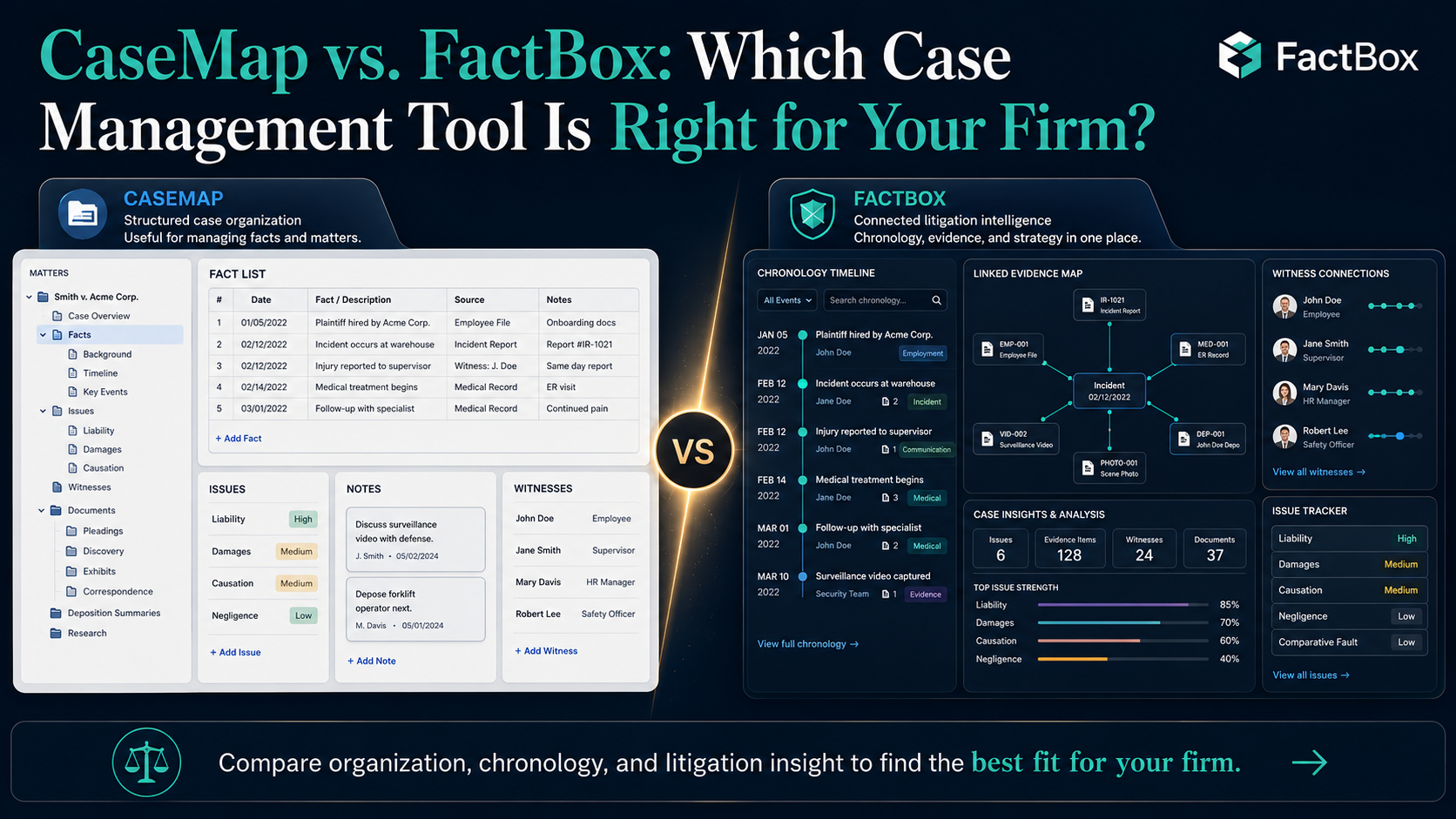
If you’re a litigator researching case management software, two names keep coming up in the fact-organization category: CaseMap and FactBox. They solve similar problems — organizing case facts, linking them to source documents, and building chronologies — but they come from very different eras of legal technology, and the experience of using them couldn’t be more different.
CaseMap, now branded as CaseMap+ AI, is the legacy incumbent. Built by LexisNexis (originally launched in 2000), it’s been the default choice for complex litigation case analysis for over two decades. It recently migrated to the cloud and added AI features. FactBox is the modern challenger — a cloud-native platform built specifically for litigators who want fact management without the overhead of an enterprise system.
This article is a frank comparison. Both tools have real strengths. The right choice depends on your firm’s size, budget, technical comfort, and what you actually need from case management software.
The Fundamental Difference
CaseMap is a case analysis platform embedded in the LexisNexis ecosystem. It’s designed to be part of a broader suite that includes Sanction (courtroom presentation), TextMap (transcript management), TimeMap (timeline visualization), and Lexis+ AI (legal research). If you’re a large firm already invested in LexisNexis products, CaseMap connects to that ecosystem in ways standalone tools can’t.
FactBox is a fact management tool built to do one thing extremely well: organize the facts of your case so you can find anything, see connections, and generate reports instantly. It’s not trying to be a legal research platform, a courtroom presentation tool, or a practice management system. It’s the layer between your documents and your legal arguments.
Feature Comparison
Fact organization: Both tools let you create structured case entries with dates, descriptions, sources, and issue tags. CaseMap uses a spreadsheet-style interface with a relational database underneath — facts, issues, documents, and people live in separate but linked tables. FactBox uses a hierarchical issue structure (issues, sub-issues, sub-sub-issues) with facts organized within that structure. Both approaches work; FactBox’s feels more intuitive for how most litigators actually think about their cases.
Document linking: Both tools connect facts to source documents. CaseMap+ AI supports 98 file formats and includes a built-in document viewer with OCR. FactBox lets you upload documents and link them to facts with one-click access from any chronology entry. CaseMap has the edge on file format breadth; FactBox has the edge on simplicity.
AI features: CaseMap+ AI has leaned into generative AI — it generates topical summaries of documents and transcripts, identifies key facts and entities, and creates editable analyses. FactBox uses AI to automatically organize facts, dates, and connections when you upload documents. CaseMap’s AI is more extensive; FactBox’s is more focused on the specific task of getting your case organized fast.
Collaboration: This is where the gap widens. FactBox was built as a cloud-native collaboration platform from day one. Your entire team works from the same case file with real-time syncing. CaseMap+ AI has moved to the cloud and offers collaboration, but multiple user reviews cite a clunky transition from the desktop version, with one longtime user calling the cloud version “a clumsy, inconsistent shell” compared to the original desktop product.
Ease of use: This is FactBox’s strongest advantage. The learning curve is essentially zero — if you can use a web browser, you can use FactBox, and most attorneys are productive on day one. CaseMap has a well-documented learning curve. Its power comes with complexity, and reviews consistently note that it requires meaningful training to use effectively. One reviewer on Capterra wrote that they were “never able to get it to fully work” and described support as unhelpful.
Reporting: FactBox generates trial-ready reports in a single click — witness-specific chronologies, issue-based timelines, case summaries for client updates. CaseMap offers customizable reports and visual maps, plus integration with TimeMap for timeline visualization. CaseMap’s reporting is more configurable; FactBox’s is faster to use.
Integrations: CaseMap connects to the LexisNexis suite (Sanction, TextMap, TimeMap, Lexis+ AI) and integrates with iManage and RelativityOne. FactBox integrates with Clio, Box, Dropbox, and other tools litigators commonly use. If you’re a LexisNexis shop, CaseMap’s ecosystem is a major plus. If you’re not, FactBox’s integrations are more practical.
Pricing
This is where the comparison gets stark.
FactBox starts at $49/month with unlimited cases and no setup fees. There’s a 7-day free trial with no credit card required. Pricing scales based on users, up to $499/month for larger teams.
CaseMap+ AI doesn’t publish transparent pricing. Industry sources estimate $50–100+/user/month for the standard plan. For a 10-user firm, that could be $500–$1,000/month before you add other LexisNexis products. Budget thresholds for considering CaseMap should start around $5,000 annually, and the total cost of ownership rises quickly when you factor in training time, potential implementation costs, and ecosystem lock-in.
For a solo practitioner or small firm, the cost difference is significant. For a large firm already paying for LexisNexis, CaseMap may be a marginal add-on to an existing relationship.
Who Should Choose CaseMap
CaseMap is the right choice if:
- Your firm is already deeply embedded in the LexisNexis ecosystem and wants seamless integration with Sanction, TextMap, TimeMap, and Lexis+ AI.
- You handle extremely complex litigation with massive document volumes and need enterprise-grade file format support (98 formats, OCR, built-in document viewer).
- Your firm has dedicated litigation support staff who can invest the time to learn the platform and manage it for attorneys.
- Budget isn’t a primary constraint, and you’re evaluating CaseMap as part of a broader LexisNexis relationship.
- You need AI-powered transcript summarization and topical analysis as a core workflow, not just a nice-to-have.
Who Should Choose FactBox
FactBox is the right choice if:
- You want to be productive on day one without training, implementation timelines, or IT involvement.
- Your priority is organizing facts, building chronologies, and generating reports — not managing a complex software platform.
- You’re a solo practitioner, small firm, or mid-size team that needs powerful fact management without enterprise pricing.
- Real-time collaboration is critical — your team needs to work from the same case file with instant syncing.
- You value simplicity and speed over feature breadth. You’d rather have a tool that does fact management perfectly than a platform that does 20 things adequately.
- You’re tired of spreadsheets but not ready to commit to an enterprise platform with annual contracts and opaque pricing.
- You want to try before you buy — FactBox’s free trial lets you build a real case before spending a dollar.
The Honest Take
CaseMap defined this category. For 20 years, it was the only serious option for structured case analysis. But the transition to the cloud has been rocky, and user sentiment reflects that. Meanwhile, FactBox was born in the cloud, designed for modern workflows, and priced for real law practices — not enterprise procurement departments.
If you’re a large firm already invested in LexisNexis, CaseMap+ AI is the path of least resistance. If you’re everyone else — and that’s most litigators — FactBox gives you the fact management capabilities you need at a fraction of the cost, complexity, and learning curve.
The best way to decide is to try both. CaseMap requires a demo and sales conversation. FactBox lets you start building chronologies in the next five minutes.