

Every litigator builds chronologies. Not most — every single one.
A survey of attorneys at AmLaw firms found that 100% of respondents create a case chronology on every case. And 90% of them build those chronologies in Excel or Word.
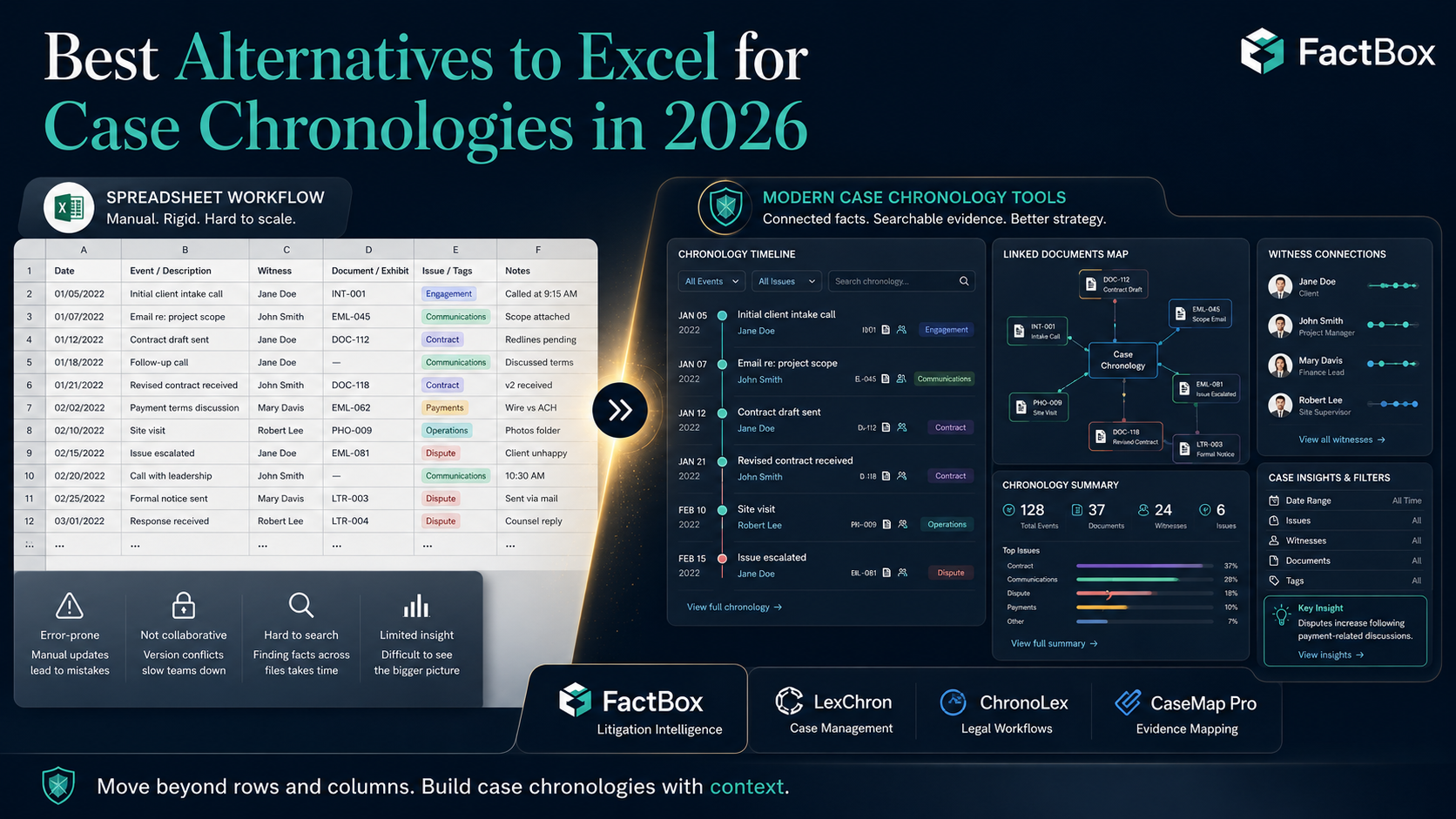
That second number should alarm you. Not because Excel is bad software — it’s extraordinary for what it was designed to do. But a case chronology isn’t a spreadsheet problem. It’s a fact management problem. And the gap between what Excel can do and what litigators actually need is where cases get disorganized, facts get lost, and trial prep becomes a scramble.
If you’ve ever inherited a case and spent your first week trying to decipher someone else’s spreadsheet — figuring out which tab matters, which column has the source references, whether the dates are formatted consistently, and whether the whole thing is even current — you already know the problem. You just haven’t named it yet.
This article breaks down why Excel fails at case chronologies, what purpose-built alternatives look like, and why FactBox has become the tool of choice for litigators who are done fighting their spreadsheets.
Why Excel Breaks Down for Litigation
Excel works beautifully for simple, static, single-user data. A case chronology is none of those things.
Here’s where the friction shows up:
No link between the fact and the source. In Excel, a chronology entry is a row. The date goes in Column A, the description in Column B, maybe a source reference in Column C. But that reference is just text — there’s no clickable link to the actual document. When you’re preparing for a deposition and you need to verify a fact, you have to leave the spreadsheet, go find the document in your file system, open it, and locate the relevant passage. Multiply that by 200 facts and you’ve burned half a day.
No multi-dimensional filtering. A case chronology isn’t just a timeline. You need to see the same facts organized by witness, by issue, by document source, and by theme. In Excel, that means separate tabs, pivot tables, or complex filter configurations that break when someone adds a row. In a purpose-built tool, it’s one click.
Version control is a fiction. The moment two people are working on the same chronology, you have a versioning problem. “Smith_chronology_v3_FINAL_JB_edits_REAL_FINAL.xlsx” is not a workflow — it’s a cry for help. There’s no real-time collaboration, no conflict resolution, no audit trail of who changed what and when.
No structured relationships. A case chronology isn’t a flat list. Facts relate to issues. Issues have sub-issues. Witnesses connect to facts. Documents support or contradict other documents. Excel has rows and columns. It cannot model relationships, hierarchies, or connections between data points in any meaningful way.
No trial-ready output. When it’s time to generate a witness-specific chronology for deposition prep, or an issue-based timeline for a motion, you’re manually copying, filtering, reformatting, and praying you didn’t miss anything. There’s no “generate a report for Witness X, limited to Issues 1 and 3, with source documents linked” button in Excel.
What Purpose-Built Case Chronology Software Actually Does
The legal tech market has matured significantly. There are now several tools designed specifically for the chronology workflow that litigators have been trying to force Excel into handling. Here’s what the category looks like:
CaseMap+ AI (LexisNexis) is the legacy incumbent. It’s been around for over 20 years and recently moved to the cloud with AI features. It organizes facts, documents, and issues in a relational database with timeline visualization. The trade-off: it’s part of the LexisNexis ecosystem, which means enterprise pricing (starting around $50–100/user/month), a meaningful learning curve, and some users report the cloud version is a step back from the beloved desktop original. Reviews on Capterra show frustration with slow feature rollouts and support quality.
TrialLine is a visual timeline tool that integrates with Clio. It turns matters into interactive, color-coded timelines that you can share with mediators and co-counsel. At $59/user/month (or $41 annually), it’s solid for visualization, but it’s more of a presentation layer than a fact management system. It doesn’t have the deep issue-based organization or source document linking that complex litigation demands.
Opus 2 is a UK-headquartered litigation management platform used heavily in international arbitration and commercial litigation. It includes chronology tools as part of a broader suite. It’s powerful but oriented toward large firms and complex cross-border disputes. Pricing is enterprise-level and not publicly available.
Everchron targets AmLaw firms with a platform purpose-built for case chronologies and fact development. It’s designed to sit alongside eDiscovery tools like Relativity. Strong product, but oriented toward the large-firm market.
FactBox takes a different approach. Rather than building a massive platform that tries to be everything, FactBox focuses relentlessly on fact management — the core workflow that every litigator needs but that no general-purpose tool handles well.
Where FactBox Wins
FactBox was built by people who came from careers in corporate investigations. They’d lived the spreadsheet problem firsthand and built the tool they wished they’d had. Here’s what makes it different:
Issue-based organization from the ground up. When you create a case in FactBox, you define your issue structure — issues, sub-issues, sub-sub-issues — the way you actually think about your case. Every fact you enter connects to this structure. The result is a chronology that doesn’t just list what happened, but maps directly to the legal arguments you’re building.
Every fact links to its source. Upload a document, and the facts you extract from it maintain a permanent, clickable connection to that source. In a deposition, when opposing counsel challenges a fact, you’re one click from the supporting document. No searching through folders. No guessing which PDF it was in.
Filtering that actually works. View your entire chronology by issue, by witness, by date range, by custom tags, or by source — instantly. Need only the facts related to the “damages” issue from Witness A’s deposition? That’s a 10-second filter, not a 30-minute spreadsheet exercise.
Real-time collaboration. Your entire team — associates, paralegals, co-counsel — works from the same case file. Updates sync instantly. No more emailing spreadsheets. No more version conflicts. You can see who added what and when.
Trial-ready reports in one click. Generate witness-specific chronologies for depositions. Export issue-based timelines for motions. Build case summaries for client updates. FactBox users report reducing client briefing prep from 3 hours to 5 minutes.
Accessible pricing. Plans start at $49/month with unlimited cases, no setup fees, and a 7-day free trial with no credit card required. Compare that to enterprise platforms that require annual contracts, custom quotes, and weeks of onboarding.
Zero learning curve. If you can use a web browser, you can use FactBox. Most attorneys are productive on day one. That’s not marketing copy — it’s a reflection of a design philosophy that prioritizes litigators over IT departments.
The Real Cost of Staying in Excel
The argument for Excel is always the same: “It’s free. I already know how to use it. It works fine.”
But “fine” has a cost. Litigators spend an estimated 6+ hours per week on document management tasks like searching, organizing, and building timelines. At $400/hour, that’s $2,400 per week — $124,800 per year — spent on case organization that a purpose-built tool could handle in a fraction of the time.
More importantly, the hidden costs aren’t just financial. They’re strategic. When your chronology is a mess, you miss connections. When you can’t filter by issue in real time, you go into depositions underprepared. When your team is working from different versions of the truth, mistakes happen. And in litigation, mistakes are expensive.
Excel didn’t fail you. You just outgrew it. The question isn’t whether you should switch — it’s how much longer you can afford not to.
Making the Move
The transition from Excel to FactBox isn’t a rip-and-replace. You can start with your next new case:
- Sign up for the free trial. No credit card, no sales call, no IT department involvement.
- Upload your case documents. FactBox organizes facts, dates, and connections from them.
- Define your issue structure. Map out the legal issues the way you think about the case.
- Start entering facts. Tag them by issue, witness, and source. Link them to documents.
- Invite your team. Everyone works from the same facts, in real time.
By the end of your first case in FactBox, you’ll wonder why you spent years fighting Excel. And you’ll never go back.